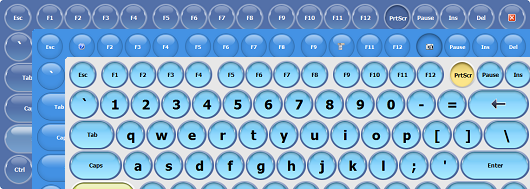
- New "Windows Light" style has been added. The "Windows 10" style has been renamed to "Windows Dark". Some styles have been slightly modified. The "Transparent" style has been removed.
- New ability to select a zoom from 100% to 800% in the keyboard edit window has been added.
- New "Transparent" keyboard has been added.

- New keyboard shortcut icons for Windows 10 have been added.
- New command line parameter /EVENTLOG has been added. It instructs the application to create different log files for every startup.
- Improved: The "Windows 10 style" setting has been changed by "Rounded corners" setting. The rounding of the keys increases according to the zooming of the keyboard.
- Improved: The "Shift+Key" action has been added to the swipe down gesture.
- Improved: The "Temporarily hide the keyboard when a system window is visible in Windows 8 and above" setting is not set by default.
- Fixed issue with double letter entry when typing with fingers on the screen.
- Fixed some memory leaks.
- Lots of other fixes and improvements.
- New: Japanese interface language has been added. Almost all user interface languages have been improved.
- New action "Activate the next keyboard shortcuts file" has been added.
- New: The Ctrl+Backspace hotkey has been added to the Text Suggestion window, which allows you to delete the last added word.
- New: An additional key automatically appears next to the left Shift key for the on-screen keyboard, if the additional key is present in the language layout. The extra keyboard files have been removed.
- New: Additional keys now appear next to the space bar for Korean and Japanese.
- New: The right Shift key now displays a special label for the Chinese layout.
- New: The necessity of double clicking for the right Shift key has been removed for the Chinese layout.
- New: Turning on the Caps Lock with the right Shift key has been removed for the Chinese layout.
- New expert settings have been added:
- Hold down the key when it's double-clicked
- Show enlarged icons on the on-screen keyboard, if possible
- Hide the keyboard when this device is found
- Move the mouse after clicking the floating icon
- Improved: Expert settings have been divided into groups.
- Improved: Support for English dictionaries and text templates has been added to Korean, Chinese and Japanese.
- Improved: The label on the Enter key is now different when Chinese Simplified is active.
- Improved: The function of displaying hieroglyphs next to the Latin letters on the on-screen keyboard has been improved.
- Improved: For console applications, the on-screen keyboard now always appears if the "Show the keyboard when the text cursor is visible" option is set.
- Improved: The launch of the program has been accelerated.
- Improved: The label on the AltGr key now depends on the input language.
- Improved: Detection of the Web site icon for the "Open URL" action has been improved.
- Improved: The sorting of actions in the Keyboard Shortcuts Settings window and in the popup menu in the system tray have been changed.
- Improved: When you switch the on-screen keyboard, its location does not change.
- Improved: The "Keyboard Shortcuts Settings" window now scales the on-screen keyboard when necessary.
- Improved: A wider border for the keys is drawn if the screen scale exceeds 200%.
- Improved: An additional check has been added that prohibits the launch of multiple instances of the program.
- Improved: The ability to create a new keyboard or delete a keyboard has been added to the keyboard selection window.
- Improved: Compatibility with Kioware and SiteKiosk has been improved.
- Fixed: The close icon and the settings icon were incorrectly displayed on the letter keys of the on-screen keyboard.
- Fixed: If the AccessDenied option is activated, the settings key and the close key on the on-screen keyboard are now hidden.
- Fixed: After adding a new keyboard, it now appears in the list of keyboards for selection.
- Fixed: Now the context menu does not appear for the floating icon and the floating window if the AccessDenied option is activated.
- Fixed issues when typing in Windows 10 using a stylus.
- Fixed: Unicode text is now supported when using the tag.
- Fixed: The touchscreen is now detected, even if the system only has single-touch touchscreen.
- Fixed: Some issues with the Text Suggestions window have been fixed.
- Lots of other fixes and improvements.
- Lots of improvements for Windows 7 and Windows 8 touch-screen support.
- Hot Virtual Keyboard has been tested to meet all of the technical requirements to be Windows 8 Compatible.
- Improved: Section "Exceptions" has been replaced with new section "Dependencies". Hot Virtual Keyboard changes the settings depending on the currently active application.

- New function "Show alternate characters or symbols" has been added. Hot Virtual Keyboard will show alternative characters when you press and hold a key. The selected character is typed when you release the key. The feature doesn't work when the "Enable key repeat" setting is on.

- New: The word suggestion tool now processes the ' character in combinations like I'll, L'amour.
- Improved: Setting "Show the toolbar in the taskbar" has been added for 64-bit systems.

- Improved: Changed the keyboard icon.
- New settings in the keyboard editing window have been added:
- Change "Fit Width" regardless of the program settings,
- Change "Lock Aspect Ratio" regardless of the program settings,
- Always dock the virtual keyboard to the lower edge of the screen,
- Always display characters and icons in the center of keys,
- Always transparent keyboard background,
- Fixed font size for all key labels (if empty, use the one from the program settings),
- Dividing points - used when changing the keyboard size. The keyboard splits along the specified points, the keys slide in opposite directions.
- Improved the Docking function for full-screen applications (IE in the kiosk mode) and Windows 8.
- Improved: The default settings have been changed.
- Improved: The keyboard editing window has been improved.
- Improved: Color scheme "Black" has been slightly adjusted.
- New: Option "Windows 8 Style" in the "Appearance" section - when enabled, rounded corners of windows and buttons are turned off.
- New: Ability to change the assigned key combination in window "Keyboard Shortcuts Settings" has been added.

- New: Ability to copy an action in window "Keyboard Shortcuts Settings" has been added.
- New: Action "Word autocomplete on/off" has been added.
- Improved: The size of word suggestion buttons changes depending on the keyboard font size.
- New: Added special keyboard types for touch screens: TouchScreenLetters, TouchScreenFull.

- New: Flag for Thai language has been added.
- New: Slovak interface language has been added.
- Fixed: The bug that occurred when switching the input language to extended layouts has been fixed.
- Fixed: The incorrect positioning of characters in the Japanese Hiragana, Kana layout has been fixed.
- Code optimization and various minor improvements.
- Added a toolbar for launching the on-screen keyboard.
- Added a new parameter "Show the program toolbar in the taskbar".
- Added new keyboard types: SkinWin7, SkinMulticolor, SkinWhite, SkinRound1, SkinRound2, SkinRound3, TwoSides.
- Changed keyboard types: OneSide, OneSide2.
- Added new options for assigning images to each key of the on-screen keyboard: separate images for different key states, a separate font color for each key state, "Draw a border around a key", "Resize with a key", "Fit by width and height".
- Added a new parameter for the on-screen keyboard: "When I enter a password don't show which keys are tapped".
- Enhanced the large icons on the multimedia keys of the on-screen keyboard.
- Words entered by users are now recorded in UTF-8.
- Added a new command line parameter /RESTORE.
- Added large flag images (32x32) for the language bar and the on-screen keyboard.
- Added the display of the flag and a "Show label" setting for the custom view of the language bar. The size of the flag depends on the size of the language bar (16x16 or 32x32).
- Added an ability to launch several instances of the program using the /M command line parameter.
- Added an ability to launch Microsoft's on-screen keyboard in the keyboard editing, hotkey configuration and icon management windows.
- When working with the word autocomplete function enabled, "-" and "&" characters do not trigger automatic word completion.
- Added the display of the keyboard layout when dead keys are pressed (for German, French and other languages).
- The Office2003 theme has been replaced with the Aqua theme.
- Added a new parameter in the "Keys" section: "Labels on system keys depend on the currently selected input language".
- Added a new parameter in the "Keys" section: "Show the state of Caps Lock, Num Lock and Scroll Lock keys".
- Added an ability to configure the list of keyboards in the "Activate the next keyboard type" action settings.
- Added an ability to assign a separate sound to each action.
- Added an ability to remove the word directly from the autocompletion list by highlighting the unnecessary word and then pressing Delete key.
- Added a new parameter for the word autocomplete function: "Do not show words with 1 character remaining".
- Added a new parameter for the word autocomplete function: "Show as a set of buttons next to the on-screen keyboard".
- Added new interface languages: Byelorussian, Croatian.
- Fixed bugs that occurred in Windows Vista and Windows 7 with User Account Control (UAC) enabled.
- Fixed the work of the command line parameter /COMMON.
- Fixed a bug: The on-screen keyboard was displayed incorrectly before logging in on multi-monitor systems.
- Fixed a bug: The on-screen keyboard was displayed incorrectly next to the text cursor on multi-monitor systems.
- Fixed a bug: In some cases, the language bar docked next to the on-screen keyboard changed its location on the screen.
Download virtual keyboard.